
SQL Repair Tool - Top Highlighted Features
- Repair corrupt SQL MDF/NDF files
- Quick Scan for Minor Issues & Advanced Scan for Severe Corruption
- Auto-Detect the SQL Server version
- SQL Database Repair Tool to Recover all components of SQL database
- Provide support for the recovery of Primary/ Foreign key
- Export large extent SQL database after repair
- Preview deleted SQL database objects in Red color
- Recover deleted Table, Stored Procedure, Functions, Views, Indexes
- Repair MDF file from virus attack (Wallet Ransomware)
- Migrate SQL database tables from one database to another
- Support standard & user defined schemas
- Different options to export recovered data
- Recover data type like JSON, Vector, XML & ASCII
- Repair MDF file of SQL Server 2025 & below versions
Repair MDF File From Any Corruption
SQL Server database can be damaged due to physical or logical corruption in the database. This might make the Server show the following types of symptoms which will help you in determining that your SQL database has been affected with corruption and needs to be repaired. This is where the SQL Database Repair Tool helps with resolving the below mentioned issues:
- The SQL Server database become inaccessible
- Hardware faulty like Disk, CPU, Controller
- IO Susbsytem level
- Malicious infection
- Power outage in the middle of transaction
- Table
- Triggers
- Stored Procedure
- Views
- Rules
- Functions
- Indexes
SQL Database Repair Tool Smart Features
Repair MDF & NDF File in SQL Server
SQL Repair Tool is able to repair MDF and NDF Files with all its database objects in much less time. You can recover SQL server database without any file size limitation. MDF Recovery Software repair MDF files of large sized database objects and also recover deleted records from SQL table.
This convenient and robust SQL Database Repair Tool recovers all existing SQL database objects like Table, Triggers, Stored Procedure, Views, Rules etc. SQL repair tool is capable of recovering large sized tables. It also supports ASCII and Unicode XML datatypes. Also, this software allows the user to recover deleted SQL database objects easily.
SQL Repair Tool gives you dual scanning options. One is 'Quick Scan' and the other is 'Advance Scan'. Choose Quick scan, if normal level corruption persists else choose Advance scan, if you have high level of corruption.SQL recovery software scans corrupted MDF file data and if any corruption persists, the recovery process is done at the same time.
SQL Server Repair Tool provides you two different options for exporting database objects of MDF & NDF files, i.e., SQL Server Database or SQL Server Compatible script. Choose SQL Server database option to export data into Live SQL Server database or as SQL Server compatible script to export data as .sql script.
With the help of SQL Database Repair Tool, database administrators can easily recover SQL Server database and further export SQL table records to CSV file. This CSV file can later be used for data analysis, report generation, or further importing tables into SQL Database from server to another.
SQL Recovery Tool maintains the integrity of the database objects, hence it recovers and maintains the database keys(Primary /Foreign) associated with tables. Both Primary as well as Foreign Keys are supported by SQL Repair utility for recovery process and the tool ensures no structural changes occur during the repair process.
SQL Server Database Repair Software is capable of supporting the Advanced data types. The tool recovers Datetime2, hierarchyid, geometry & datetimeoffset, sql_variant, geography data types. Furthermore, it also supports data types like JSON, Vector, ASCII, and Unicode XML.
Sometimes the user faces unusual behaviour of the system like spam emails, unauthenticated downloads of software etc. SQL Repair Tool protects your SQL Server database by recovering your data from the Ransomware affected database files. The tool also helps recover data from SQLi affected files.
Export Only Schema or Schema and Data Both
Depending on the user's requirements, the SQL Database Repair Tool offers dual options to export data. They can export the database schema only or with schema and data both. These features help users save time and storage while exporting recovered data.
Select and Save Desired Database Objects
This MSSQL Recovery tool allows you to export only the selected SQL database objects to the desired location. This feature allows users to save time and space within the database by only exporting the required tables, indexes, functions, stored procedures, etc.
Exports as SQL Database or as SQL Script
SQL repair tool provides you two different options for exporting database objects of MDF & NDF files, i.e., SQL Server Database or SQL Server Compatible script. Choose SQL Server database option to export data into SQL Server database or as SQL Server compatible script to export data as .sql script.
Supports Latest SQL Server Version
SQL Database Repair Tool supports MDF/NDF files of SQL Server 2025/ 2022/ 2019/ 2017/ 2016/ 2014/ 2012/ 2008 R2/ 2008/ 2005/ 2000 versions. It is very feasible and can be installed on all Windows operating systems of bit 32 or 64. Hence,you can easily recover SQL database of any version.
How to Recover SQL Database?
Screenshots of SQL Database Repair Tool


Watch How SQL Recovery Software Works
Common SQL Issues Fixed
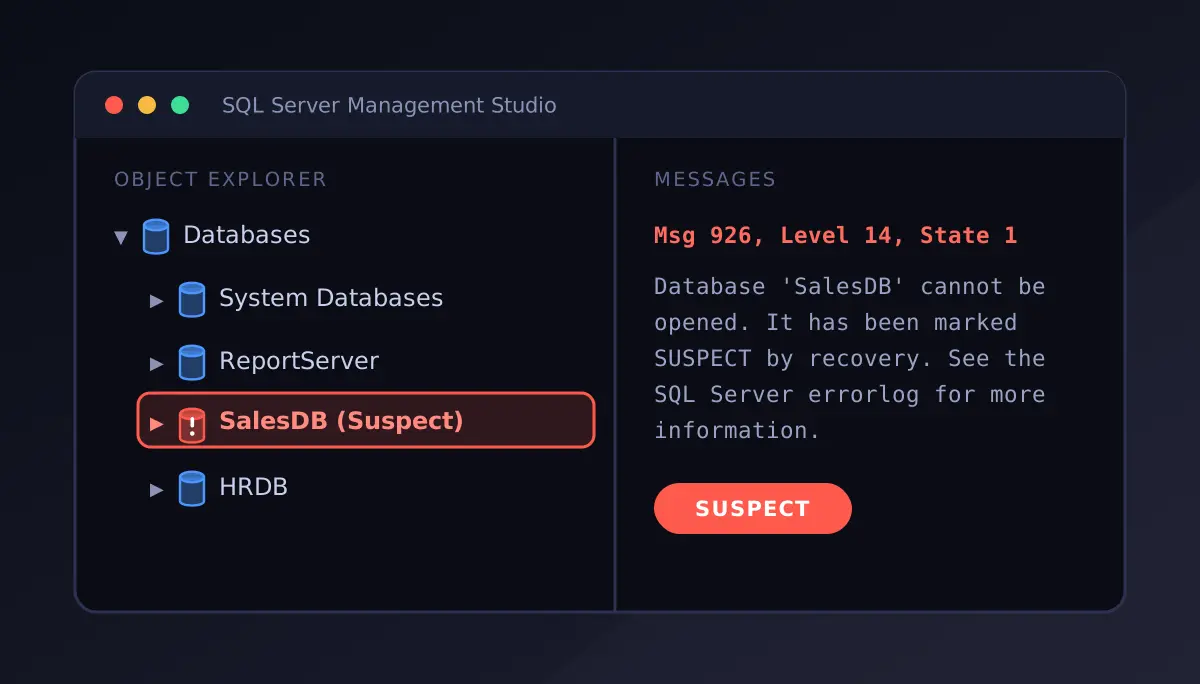
Know how to fix SQL Database in Suspect mode. When a database is marked as Suspect mode, the database engine often fails to complete the recovery process. This results in making the database inaccessible for users. The SQL Database Repair utility helps users recover the database from Suspect Mode with ease and precision.
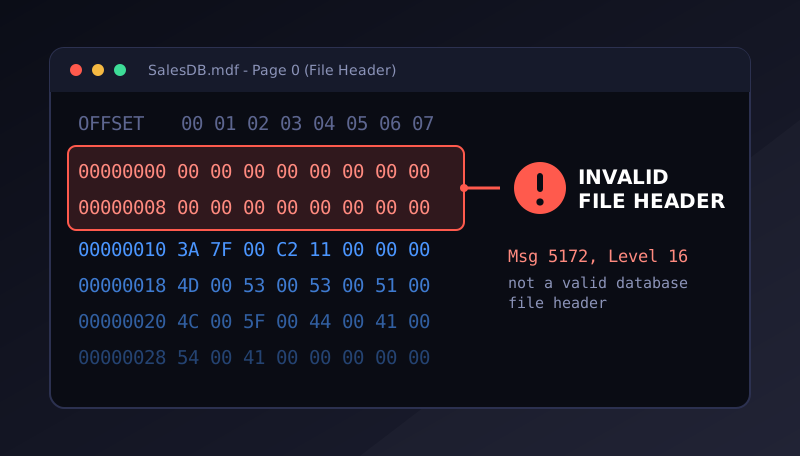
With a corrupt MDF file header, SQL Server might not recognize or open a database. This might also occur due to abrupt system shutdowns, storage failures, or due to damaged file structures. The SQL Repair Tool allows users to scan the damaged database file and recover the accessible records.
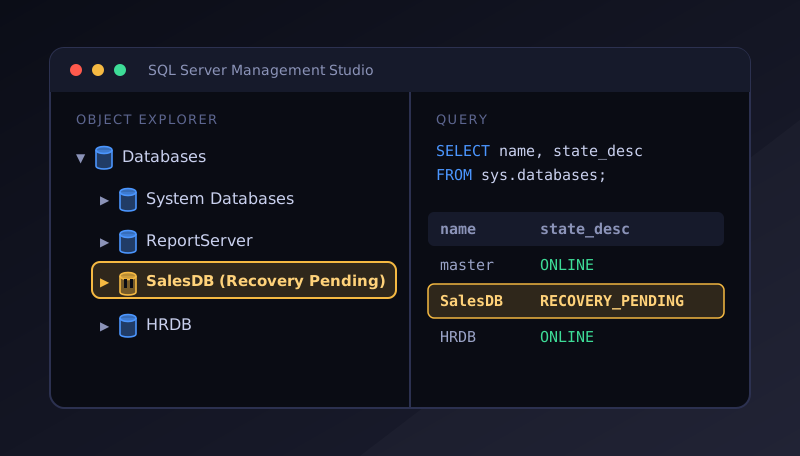
Recovery Pending State in SQL Server indicates that the SQL Server engine cannot start the recovery process. With this advanced utility, users can resolve database issues causing Recovery Pending state and restore healthy data even when the database cannot be brought online using normal SQL commands.
SQL Database Repair Tool - Software Specifications
Know the Software Requirements to Install SQL Recovery Tool Seamlessly
Usability Requirements
Choose the Right Edition - Free vs Licensed
| Features | Demo | Full Version |
|---|---|---|
| Add SQL Primary & Secondary Files | Yes | Yes |
| Dual Smart File Scan Modes | Yes | Yes |
| Preview Database Objects and Records | Yes | Yes |
| Save Scanned File in .str Format | Yes | Yes |
| Recover & Save Data from SQL Database | 25 Records / Table | All Records |
| Export Recovered Data to SQL Server Database | 25 Records / Table | All Records |
| Export Recovered Data to CSV Format | 25 Records / Table | All Records |
| Save Restored Data as SQL Script | 25 Records / Table | All Records |
| Free Download | Buy Now |
What Client Says about SQL Database Repair Tool?
When we encountered database corruption, we panicked because the data stored on the server was crucial for the team. Then someone recommended the SQL Database Repair Tool, and when we used this software, we were able to recover the complete data from the database. With the help of this tool, we were able to retrieve the sensitive information in very little time.
My .mdf file was heavily affected by wallet ransomware infection. SQL recovery tool proves to be worth it as the software easily recovered data from .mdf database file affected by wallet ransomware. Thank you!!
SQL recovery software becomes my saviour as it helped me in recovering deleted database records in SQL Server. Thanks to the developers!
We received an orphan MDF file and it was challenging for us to know what is stored in the file or whether it is corrupted or not. This is when we came across SQL Repair Tool. Using this software, it was easy to access the file and also recover the data stored within, irrespective of database file corruption.
Free Download SQL Database Repair Tool & Submit Your Review
Product FAQs
Can I repair MDF file using SQL database repair tool without installing SQL Server on my system?
Is there any file size limitations to repair corrupt SQL database using SQL Recovery Tool?
I am facing SQL Error 945. Can I be able to repair suspect database using SQL database recovery tool?
Can I repair corrupted SQL database of version 2025 using this SQL Database Recovery tool?
Perform the following steps to repair mdf file using SQL recovery tool:
- Install and run the tool
- Click on "Open" then select and add corrupted MDF file
- Select scanning mode, Quick or Scan and select MDF file Version
- Software will start scanning MDF file and repair MDF file quickly
- Preview all the repaired items of MDF file
- Click on "Export" to save the repaired items.
Is it possible to convert .mdf to .sql script file using SQL Database Recovery Tool?
Is it possible to repair .mdf file without knowing its version?
Is it possible to repair .mdf file, which has been affected from wallet ransomware using SQL database recovery tool?
I have to migrate data from one database to another. Can the SQL Recovery Software help with migration?
Can I recover deleted records in SQL server using SQL Repair Tool?
Repair corrupt MDF and NDF database files, recover records from inaccessible databases, and restore a complete database with the advanced SQL Database Repair Tool.